 Web Data Streams II Web Data Streams II
As we have introduced in Web Data Streams I, Large amounts of data are available on the Web in the form of plain text, HTML, structured text such as XML and JSON, and in binary formats such as bitmapped images. In this project we shall give additional examples of how to access and manipulate data available on the Web from an Android application. The reader will be assumed familiar with the material found in Web Data Streams I, and the content here is largely variations on a similar theme. Thus, our explanations will not give as much detail as in some other projects.
Create a new project in Eclipse by selecting New > Android Project (or File > Project > Android > Android Project > Next) and filling in the following information on the screen that results.
Click Next and then accept the defaults on the remaining screens to create the project webDataStreams2.
Edit res/values/strings.xml to give
   <?xml version="1.0" encoding="utf-8"?>
   <resources>
      <string name="app_name">WebDataStreams2</string>
      <string name="action_settings">Settings</string>
      <string name="hello">Web Data Streams II</string>
      <string name="main_title">Web Data Streams II</string>
      <string name="QA_example">Astro Question (POST)</string>
      <string name="XML_example">XML Example</string>
      <string name="GET_example">GET Example</string>
      <string name="POST_example">POST Example</string>
      <string name="poststatus">POST Return</string>
      <string name="submitLabel">Submit</string>
      <string name="nextQuestionLabel">Next Question</string>
      <string name="resetLabel">Reset Score</string>
      <string name="noAnswer">You must select an answer before you click the
                  Submit button!</string>
   </resources>
Create res/values/colors.xml and edit it to give
   <?xml version="1.0" encoding="utf-8"?>
   <resources>
      <color name="backgroundColor">#ff000000</color>
      <color name="textColor">#ff000000</color>
      <color name="questionColor">#ff000000</color>
      <color name="answerColor">#ff000000</color>
      <color name="ampColor">#ff000000</color>
      <color name="scoreColor">#ff000000</color>
   </resources>
If it does not already exist, create res/values/dimens.xml and edit it to read
   <?xml version="1.0" encoding="UTF-8"?>
   <resources>
      <!-- Default screen margins, per the Android Design guidelines. -->
      <dimen name="activity_horizontal_margin">16dp</dimen>
      <dimen name="activity_vertical_margin">16dp</dimen>

      <dimen name="large_text">18sp</dimen>
      <dimen name="medium_text">17sp</dimen>
      <dimen name="small_text">16sp</dimen>
      <dimen name="button_font_size">16sp</dimen>
   </resources>
Edit res/layout/activity_main.xml to give
   <?xml version="1.0" encoding="UTF-8"?>
   <LinearLayout xmlns:android="http://schemas.android.com/apk/res/android"
      xmlns:tools="http://schemas.android.com/tools"
      android:id="@+id/LinearLayout1"
      android:layout_width="match_parent"
      android:layout_height="match_parent"
      android:orientation="vertical"
      android:paddingBottom="@dimen/activity_vertical_margin"
      android:paddingLeft="@dimen/activity_horizontal_margin"
      android:paddingRight="@dimen/activity_horizontal_margin"
      android:paddingTop="@dimen/activity_vertical_margin"
      tools:context=".MainActivity" >

      <Button
         android:id="@+id/astroQA_button"
         android:layout_width="fill_parent"
         android:layout_height="wrap_content"
         android:text="@string/QA_example"
         android:textSize="18sp" />

      <Button
         android:id="@+id/XML_button"
         android:layout_width="match_parent"
         android:layout_height="wrap_content"
         android:text="@string/XML_example"
         android:textSize="18sp" />

      <Button
         android:id="@+id/GET_button"
         android:layout_width="match_parent"
         android:layout_height="wrap_content"
         android:text="@string/GET_example"
         android:textSize="18sp" />

      <Button
         android:id="@+id/POST_button"
         android:layout_width="match_parent"
         android:layout_height="wrap_content"
         android:text="@string/POST_example"
         android:textSize="18sp" />

   </LinearLayout>
Create res/layout/astroqa.xml to give
   <?xml version="1.0" encoding="utf-8"?>
   <RelativeLayout xmlns:android="http://schemas.android.com/apk/res/android"
      android:id="@+id/RelativeLayout1"
      android:layout_width="match_parent"
      android:layout_height="match_parent"
      android:orientation="vertical"
      android:paddingLeft="5dip"
      android:paddingRight="5dip" >

      <ProgressBar
         android:id="@+id/qa_bar"
         style="@android:style/Widget.ProgressBar.Small"
         android:layout_width="wrap_content"
         android:layout_height="wrap_content"
         android:layout_centerHorizontal="true"
         android:layout_centerInParent="true"
         android:layout_gravity="center" />

      <ScrollView
         android:id="@+id/ScrollView01"
         android:layout_width="match_parent"
         android:layout_height="match_parent"
         android:layout_alignParentLeft="true"
         android:layout_alignParentTop="true"
         android:layout_below="@+id/qa_bar" >

         <LinearLayout
               android:layout_width="match_parent"
               android:layout_height="wrap_content"
               android:orientation="vertical" >

               <TextView
                  android:id="@+id/TextView01"
                  android:layout_width="match_parent"
                  android:layout_height="wrap_content"
                  android:paddingLeft="3dp"
                  android:paddingRight="3dp"
                  android:text=""
                  android:textColor="@color/textColor"
                  android:textSize="@dimen/large_text" />

               <RadioGroup
                  android:id="@+id/radiobuttons"
                  android:layout_width="match_parent"
                  android:layout_height="wrap_content"
                  android:orientation="vertical"
                  android:paddingBottom="15dp"
                  android:paddingLeft="5dp"
                  android:paddingRight="5dp"
                  android:paddingTop="5dp" >

                  <RadioButton
                     android:id="@+id/answerA"
                     android:layout_width="wrap_content"
                     android:layout_height="wrap_content"
                     android:text=""
                     android:textColor="@color/textColor"
                     android:textSize="@dimen/medium_text" />

                  <RadioButton
                     android:id="@+id/answerB"
                     android:layout_width="wrap_content"
                     android:layout_height="wrap_content"
                     android:text=""
                     android:textColor="@color/textColor"
                     android:textSize="@dimen/medium_text" />

                  <RadioButton
                     android:id="@+id/answerC"
                     android:layout_width="wrap_content"
                     android:layout_height="wrap_content"
                     android:text=""
                     android:textColor="@color/textColor"
                     android:textSize="@dimen/medium_text" />

                  <RadioButton
                     android:id="@+id/answerD"
                     android:layout_width="wrap_content"
                     android:layout_height="wrap_content"
                     android:text=""
                     android:textColor="@color/textColor"
                     android:textSize="@dimen/medium_text" />

                  <RadioButton
                     android:id="@+id/answerE"
                     android:layout_width="wrap_content"
                     android:layout_height="wrap_content"
                     android:text=""
                     android:textColor="@color/textColor"
                     android:textSize="@dimen/medium_text" />
               </RadioGroup>

               <Button
                  android:id="@+id/submit_button"
                  android:layout_width="wrap_content"
                  android:layout_height="wrap_content"
                  android:paddingLeft="10dp"
                  android:text="@string/submitLabel"
                  android:textSize="@dimen/button_font_size" />
         </LinearLayout>
      </ScrollView>

   </RelativeLayout>
Create res/layout/answerscreen.xml and edit it to give
   <?xml version="1.0" encoding="utf-8"?>
   <LinearLayout xmlns:android="http://schemas.android.com/apk/res/android"
      android:layout_width="match_parent"
      android:layout_height="match_parent"
      android:orientation="vertical"
      android:paddingLeft="5dip"
      android:paddingRight="5dip"
      android:paddingTop="10dp" >

      <TextView
         android:id="@+id/TextView02"
         android:layout_width="fill_parent"
         android:layout_height="wrap_content"
         android:paddingLeft="2dp"
         android:paddingRight="2dp"
         android:paddingTop="3dp"
         android:text=""
         android:textColor="@color/questionColor"
         android:textSize="@dimen/large_text" />

      <TextView
         android:id="@+id/TextView03"
         android:layout_width="match_parent"
         android:layout_height="wrap_content"
         android:paddingLeft="10dp"
         android:paddingRight="2dp"
         android:paddingTop="7dp"
         android:text=""
         android:textColor="@color/answerColor"
         android:textSize="@dimen/medium_text" />

      <TextView
         android:id="@+id/TextView04"
         android:layout_width="match_parent"
         android:layout_height="wrap_content"
         android:paddingBottom="5pt"
         android:paddingLeft="2dp"
         android:paddingRight="2dp"
         android:paddingTop="0dp"
         android:text=""
         android:textColor="@color/ampColor"
         android:textSize="@dimen/small_text" />

      <TextView
         android:id="@+id/TextView05"
         android:layout_width="match_parent"
         android:layout_height="wrap_content"
         android:paddingBottom="10pt"
         android:paddingLeft="2dp"
         android:paddingRight="2dp"
         android:paddingTop="5dp"
         android:text=""
         android:textColor="@color/scoreColor"
         android:textSize="@dimen/medium_text" />

      <LinearLayout
         android:layout_width="match_parent"
         android:layout_height="match_parent"
         android:orientation="horizontal"
         android:paddingLeft="0dp" >

         <Button
            android:id="@+id/nextQuestion_button"
            android:layout_width="wrap_content"
            android:layout_height="wrap_content"
            android:text="@string/nextQuestionLabel"
            android:textSize="@dimen/button_font_size" />

         <Button
            android:id="@+id/reset_button"
            android:layout_width="wrap_content"
            android:layout_height="wrap_content"
            android:text="@string/resetLabel"
            android:textSize="@dimen/button_font_size" />
      </LinearLayout>

   </LinearLayout>
Create res/layout/xmlexample.xml and edit it to give
   <?xml version="1.0" encoding="utf-8"?>
   <RelativeLayout xmlns:android="http://schemas.android.com/apk/res/android"
      android:id="@+id/RelativeLayout1"
      android:layout_width="match_parent"
      android:layout_height="match_parent"
      android:orientation="vertical" >

      <ProgressBar
         android:id="@+id/xml_bar"
         style="@android:style/Widget.ProgressBar.Small"
         android:layout_width="wrap_content"
         android:layout_height="wrap_content"
         android:layout_centerHorizontal="true"
         android:layout_centerVertical="true" />

   </RelativeLayout>
Create res/layout/getexample.xml and edit to give
   <?xml version="1.0" encoding="utf-8"?>
   <RelativeLayout xmlns:android="http://schemas.android.com/apk/res/android"
      android:id="@+id/RelativeLayout1"
      android:layout_width="match_parent"
      android:layout_height="match_parent"
      android:orientation="vertical" >

      <ProgressBar
         android:id="@+id/get_bar"
         style="@android:style/Widget.ProgressBar.Small"
         android:layout_width="wrap_content"
         android:layout_height="wrap_content"
         android:layout_centerHorizontal="true"
         android:layout_centerVertical="true" />

   </RelativeLayout>
Create res/layout/postexample.xml to give
   <?xml version="1.0" encoding="utf-8"?>
   <RelativeLayout xmlns:android="http://schemas.android.com/apk/res/android"
      android:id="@+id/RelativeLayout1"
      android:layout_width="match_parent"
      android:layout_height="match_parent"
      android:orientation="vertical" >

      <ProgressBar
         android:id="@+id/post_bar"
         style="@android:style/Widget.ProgressBar.Small"
         android:layout_width="wrap_content"
         android:layout_height="wrap_content"
         android:layout_alignParentLeft="true"
         android:layout_alignParentTop="true"
         android:layout_centerHorizontal="true"
         android:layout_centerVertical="true" />

   </RelativeLayout>
Edit the manifest file to give
   <?xml version="1.0" encoding="utf-8"?>
   <manifest xmlns:android="http://schemas.android.com/apk/res/android"
      package="<YourNamespace>.webdatastreams2"
      android:versionCode="1"
      android:versionName="1.0" >

      <uses-sdk
         android:minSdkVersion="8"
         android:targetSdkVersion="18" />

      <uses-permission android:name="android.permission.INTERNET" />

      <application
         android:allowBackup="true"
         android:icon="@drawable/ic_launcher"
         android:label="@string/app_name"
         android:theme="@style/AppTheme" >
         <activity
               android:name="<YourNamespace>.webdatastreams2.MainActivity"
               android:label="@string/app_name" >
               <intent-filter>
                  <action android:name="android.intent.action.MAIN" />

                  <category android:name="android.intent.category.LAUNCHER" />
               </intent-filter>
         </activity>
         <activity android:name=".AstroQA" android:label="Question" />
         <activity android:name=".AnswerScreen" android:label="Answer" />
         <activity android:name=".XMLexample" android:label="XML Example" />
         <activity android:name=".GETexample" android:label="GET Example" />
         <activity android:name=".POSTexample" android:label="POST Example" />
      </application>

   </manifest>
Edit the class file MainActivity.java to give
   package <YourNamespace>.webdatastreams2;

   import android.os.Bundle;
   import android.app.Activity;
   import android.view.Menu;
   import android.content.Intent;
   import android.view.View;
   import android.view.View.OnClickListener;

   public class MainActivity extends Activity implements OnClickListener{

      @Override
      protected void onCreate(Bundle savedInstanceState) {
         super.onCreate(savedInstanceState);
         setContentView(R.layout.activity_main);

         // Click listeners for all buttons
         View checkButton = findViewById(R.id.astroQA_button);
         checkButton.setOnClickListener(this);
         View xmlButton = findViewById(R.id.XML_button);
         xmlButton.setOnClickListener(this);
         View getButton = findViewById(R.id.GET_button);
         getButton.setOnClickListener(this);
         View postButton = findViewById(R.id.POST_button);
         postButton.setOnClickListener(this);
      }

      @Override
      public boolean onCreateOptionsMenu(Menu menu) {
         // Inflate the menu; this adds items to the action bar if it is present.
         getMenuInflater().inflate(R.menu.main, menu);
         return true;
      }

      @Override
      public void onClick(View v) {

         switch(v.getId()){
         case R.id.astroQA_button:
            Intent i = new Intent(this, AstroQA.class);
            startActivity(i);
            break;

         case R.id.XML_button:
            Intent j = new Intent(this, XMLexample.class);
            startActivity(j);
            break;

         case R.id.GET_button:
            Intent k = new Intent(this, GETexample.class);
            startActivity(k);
            break;

         case R.id.POST_button:
            Intent m = new Intent(this, POSTexample.class);
            startActivity(m);
            break;
         }
      }
   }
Create the class file AstroQA.java and edit to give
package <YourNamespace>.webdatastreams2;
import java.io.BufferedReader;
import java.io.DataOutputStream;
import java.io.IOException;
import java.io.InputStream;
import java.io.InputStreamReader;
import java.io.UnsupportedEncodingException;
import java.net.HttpURLConnection;
import java.net.URL;
import java.net.URLEncoder;
import java.util.ArrayList;
import java.util.List;
import java.util.StringTokenizer;
import org.apache.http.Header;
import org.apache.http.HttpEntity;
import org.apache.http.HttpResponse;
import org.apache.http.NameValuePair;
import org.apache.http.client.ClientProtocolException;
import org.apache.http.client.HttpClient;
import org.apache.http.client.entity.UrlEncodedFormEntity;
import org.apache.http.client.methods.HttpPost;
import org.apache.http.impl.client.DefaultHttpClient;
import org.apache.http.message.BasicNameValuePair;
import org.apache.http.protocol.HTTP;
import org.apache.http.util.EntityUtils;
import android.app.Activity;
import android.content.Intent;
import android.content.SharedPreferences;
import android.os.AsyncTask;
import android.os.Bundle;
import android.util.Log;
import android.view.View;
import android.view.View.OnClickListener;
import android.widget.Button;
import android.widget.ProgressBar;
import android.widget.RadioButton;
import android.widget.TextView;
import android.widget.Toast;
public class AstroQA extends Activity {
// URL of questioner script on server
public static final String host_url =
"http://csep10.phys.utk.edu/cgi-bin/quizforms/course1/questioner2.pl";
public static final String TAG = "WEBSTREAM";
// Questioner data holders
private String qnum;
protected static String question;
protected static String answer[] = new String[5];
protected static String chapter = "4";
private TextView questionView;
private Bundle postData;
private RadioButton[] answerButton = new RadioButton[5];
protected static String coran = null;
protected static String amplification = null;
protected static int selectedButton = -1;
protected static String answerArray[] = {"A", "B", "C", "D", "E"};
private Button submitButton;
protected static int numberRight = 0;
protected static int numberWrong = 0;
private int numberQuestions = 0;
protected static float score = 0;
protected static boolean isCorrect;
protected static int correctIndex = -1;
protected static SharedPreferences prefs;
private ProgressBar progressBar;
@Override
public void onCreate(Bundle savedInstanceState) {
super.onCreate(savedInstanceState);
setContentView(R.layout.astroqa);
// Set up a TextView to hold the question
questionView = (TextView)findViewById(R.id.TextView01);
// Set up an array of RadioButtons for the five possible answers that are displayed
answerButton[0] = (RadioButton) findViewById(R.id.answerA);
answerButton[1] = (RadioButton) findViewById(R.id.answerB);
answerButton[2] = (RadioButton) findViewById(R.id.answerC);
answerButton[3] = (RadioButton) findViewById(R.id.answerD);
answerButton[4] = (RadioButton) findViewById(R.id.answerE);
// Add click listeners to the RadioButtons. Will process with inner class event_listener below
for(int i=0; i<5; i++){
answerButton[i].setOnClickListener(event_listener);
answerButton[i].setVisibility(View.INVISIBLE); // Hide buttons until question is displayed
}
// Set up the scoring button
submitButton = (Button) findViewById(R.id.submit_button);
submitButton.setOnClickListener(event_listener);
submitButton.setVisibility(View.INVISIBLE);
// Set up a SharedPreferences to store scores so they will persist. Variable prefs
// is protected static, so it can be accessed from other classes in this package.
prefs = this.getApplicationContext().getSharedPreferences("prefs", 0);
// Set up the name-value data pairs that will be transmitted as part of the POST request
// as elements of a Bundle.
postData = new Bundle();
postData.putString("chapter", chapter);
// Execute the POST request on a background thread
progressBar = (ProgressBar) findViewById(R.id.qa_bar);
new BackgroundLoad().execute(host_url);
}
@Override
protected void onPause(){
super.onPause();
// To prevent navigation back to previous answer screen
finish();
}
// Process button clicks for possible question answers
private OnClickListener event_listener = new OnClickListener() {
@Override
public void onClick(View v) {
// Set int selectedButton to the index of the answer chosen if the choice
// was one of the radio buttons, or execute the scoring method if the
// submit button was pressed.
switch(v.getId()){
case R.id.answerA:
selectedButton = 0;
break;
case R.id.answerB:
selectedButton = 1;
break;
case R.id.answerC:
selectedButton = 2;
break;
case R.id.answerD:
selectedButton = 3;
break;
case R.id.answerE:
selectedButton = 4;
break;
case R.id.submit_button:
processAnswer(selectedButton);
break;
}
Log.i(TAG,"Button "+selectedButton+" chosen");
}
};
// Method to process and score answer
private void processAnswer(int selectedButton){
Log.i(TAG,"ProcessAnswer, selected button = "+selectedButton);
// If no answer given, warn but do nothing
if(selectedButton < 0){
Toast.makeText(AstroQA.this, R.string.noAnswer, Toast.LENGTH_LONG).show();
return;
}
// Process and score
String ansS = answerArray[selectedButton];
isCorrect = (selectedButton == correctIndex);
// Retrieve current score parameters from shared preferences
numberRight = prefs.getInt("numberRight", 0);
numberWrong = prefs.getInt("numberWrong", 0);
numberQuestions = prefs.getInt("numberQuestions", 0);
score = prefs.getFloat("score",(float) 0.0);
numberQuestions ++;
if(isCorrect){
numberRight ++;
} else {
numberWrong ++;
}
score = (float)numberRight/(float)numberQuestions;
Log.i(TAG,"+++ coran="+coran+" ansS="+ansS+" isCorrect="+isCorrect
+" right="+numberRight+" wrong="+numberWrong+" questions="+numberQuestions
+" score="+(int)(score*100)+"%");
// Store new values in shared preferences
SharedPreferences.Editor edit = prefs.edit();
edit.putInt("numberRight", numberRight);
edit.putInt("numberWrong", numberWrong);
edit.putInt("numberQuestions", numberQuestions);
edit.putFloat("score", score);
edit.commit();
// Define an Intent to launch an answer screen
Intent i = new Intent(this, AnswerScreen.class);
startActivity(i);
}
// Method to do POST request using HttpURLConnection. Adapted from example at
// http://www.xyzws.com/Javafaq/how-to-use-httpurlconnection-post-data-to-web-server/139
// but there are errors in the code there. See also
// http://digitallibraryworld.com/?p=189
// This method is used if useApache = true in doInBackground.
public static String executePost(String targetURL, String urlParameters) {
URL url;
HttpURLConnection connection = null;
try {
//Create connection
url = new URL(targetURL);
connection = (HttpURLConnection)url.openConnection();
// Use following if length of parameters is known beforehand
connection.setFixedLengthStreamingMode(urlParameters.getBytes().length);
// Use instead
// connection.setChunkedStreamingMode(0);
// if length is not known. If one of these not used, HttpURLConnection will be forced to
// buffer complete request body in memory before it is transmitted, wasting
// heap and increasing latency.
connection.setDoOutput(true); // This implies POST connection
//Send request
DataOutputStream wr = new DataOutputStream (connection.getOutputStream ());
wr.writeBytes (urlParameters);
wr.flush ();
wr.close ();
//Get Response
InputStream is = connection.getInputStream();
BufferedReader rd = new BufferedReader(new InputStreamReader(is));
String line;
StringBuffer response = new StringBuffer();
while((line = rd.readLine()) != null) {
Log.i(TAG, "line="+line);
response.append(line);
response.append('\n');
}
rd.close();
Log.i(TAG,"response="+response.toString());
return response.toString();
} catch (Exception e) {
e.printStackTrace();
return null;
} finally {
// Disconnecting releases resources held by connection so they can be closed or reused.
if(connection != null) {
connection.disconnect();
}
}
}
// Method to implement POST method and return the response as a string using apache.
// This method is used if useApache = true in doInBackground. If useApache = false, the
// method executePost is used instead.
private String doPOST(String host_url, Bundle data){
HttpClient client = new DefaultHttpClient();
HttpPost post = new HttpPost(host_url);
HttpResponse response = null;
// Transfer the name-value pairs in the Bundle data to name-value pairs for
// the POST access
List<NameValuePair> pairs = new ArrayList<NameValuePair>();
Object [] keyset = null;
keyset = data.keySet().toArray();
for(int i=0; i<keyset.length; i++){
String key = keyset[i].toString();
Log.i(TAG, " data key = "+key);
pairs.add(new BasicNameValuePair(key, data.getString(key) ));
}
// See http://www.softwarepassion.com/android-series-get-post-and-multipart-post-requests/
UrlEncodedFormEntity ent = null;
try {
ent = new UrlEncodedFormEntity(pairs,HTTP.UTF_8);
} catch (UnsupportedEncodingException e) {
e.printStackTrace();
}
post.setEntity(ent);
String postResponseString = null;
int responseStatus = 0;
try {
response = client.execute(post);
HttpEntity resEntity = response.getEntity();
if(resEntity != null){
// Extract the response status and the headers
responseStatus = response.getStatusLine().getStatusCode();
postResponseString = EntityUtils.toString(resEntity);
Log.i(TAG, "\nPOST response and headers:" );
Log.i(TAG, "\nResponse="+response.getStatusLine());
Log.i(TAG, "Response code = "+responseStatus);
Header [] hd = response.getAllHeaders();
for(int i=0; i<hd.length; i++){
Log.i(TAG, "header="+hd[i].getName()+" value="+hd[i].getValue());
}
Log.i(TAG, "\nString returned from POST request:\n\n");
Log.i(TAG, postResponseString);
}
} catch (ClientProtocolException e1) {
e1.printStackTrace();
} catch (IOException e1) {
e1.printStackTrace();
}
return postResponseString;
}
// To process the string returned by the POST request to questioner2.pl
private void postParse(String s){
Log.i(TAG,"postParse: "+s);
StringTokenizer st = new StringTokenizer(s,"\n");
String ts;
Log.i(TAG,"\nFrom Tokenizer:\n");
qnum = st.nextToken();
qnum = qnum.substring(qnum.indexOf("=")+1).trim();
int iqnum = Integer.parseInt(qnum);
question = st.nextToken();
question = question.substring(question.indexOf("=")+1).trim();
Log.i(TAG, "qnum="+iqnum);
Log.i(TAG, "question="+question);
for(int i=0; i<5; i++){
ts = st.nextToken();
answer[i] = answerArray[i]+". "+ts.substring(ts.indexOf("=")+1).trim();
Log.i(TAG, "Answer["+i+"]: "+ answer[i]);
answerButton[i].setText(" "+answer[i]);
}
chapter = st.nextToken();
chapter = chapter.substring(chapter.indexOf("=")+1).trim();
Log.i(TAG, "chapter="+chapter);
coran = st.nextToken();
coran = coran.substring(coran.indexOf("=")+1).trim();
Log.i(TAG,"coran="+coran);
amplification = st.nextToken();
amplification = amplification.substring(amplification.indexOf("=")+1).trim();
Log.i(TAG,"amplification="+amplification);
questionView.append("\n"+question);
// Assign an integer index 0-4 to the correct answer that can be compared with
// the integer index selectedButton for the answer chosen
if(coran.equalsIgnoreCase("A")){
correctIndex = 0;
} else if (coran.equalsIgnoreCase("B")){
correctIndex = 1;
} else if (coran.equalsIgnoreCase("C")){
correctIndex = 2;
} else if (coran.equalsIgnoreCase("D")){
correctIndex = 3;
} else if (coran.equalsIgnoreCase("E")){
correctIndex = 4;
}
}
// Use AsyncTask to perform the web download on a background thread. The three
// argument types inside the < > are a type for the input parameters (Strings in this case),
// a type for any published progress during the background task (Void in this case, because
// we aren't going to publish progress since the task should be very short), and a type
// for the object returned from the background task (in this case it is type String).
private class BackgroundLoad extends AsyncTask <String, Void, String>{
// Executes the task on a background thread
@Override
protected String doInBackground(String... params) {
// The notation String... params means that the input parameters are an array of
// strings. In new BackgroundLoad().execute(host_url) above we are
// passing just one argument, so params[0] will correspond to host_url.
/* Set up the option of using either the Apache Http classes (useApache = true)
or the HttpURLConnection classes (useApache = false) to make the HTTP connection.
See the discussion of relative merits of two approaches by Jesse Wilson at
http://android-developers.blogspot.com/2011/09/androids-http-clients.html
Basically he recommends using Apache before Android 2.3, and HttpURLConnection
for later versions of Android.
*/
boolean useApache = false;
if(useApache){
return doPOST(params[0], postData);
} else {
String s =null;
try {
s = executePost(params[0], "chapter="+URLEncoder.encode(chapter, "UTF-8"));
} catch (UnsupportedEncodingException e) {
e.printStackTrace();
}
Log.i(TAG,"async: String="+s);
return s;
}
}
// Executes before the thread run by doInBackground
@Override
protected void onPreExecute () {
}
@Override
protected void onCancelled (){
}
// Executes after the thread run by doInBackground has returned. The variable s
// passed is the string value returned by doInBackground.
@Override
protected void onPostExecute(String s){
// Stop the progress bar
progressBar.setVisibility(View.GONE);
// Parse the returned string
postParse(s);
// Make buttons visible
submitButton.setVisibility(View.VISIBLE);
for(int i=0; i<5; i++){
answerButton[i].setVisibility(View.VISIBLE);
}
}
}
}
Create the class file AnswerScreen.java and edit it to give
   package <YourNamespace>.webdatastreams2;

   import android.app.Activity;
   import android.content.Intent;
   import android.content.SharedPreferences;
   import android.os.Bundle;
   import android.util.Log;
   import android.widget.Button;
   import android.widget.TextView;
   import android.view.View;
   import android.view.View.OnClickListener;

   public class AnswerScreen extends Activity {

         public static final String TAG = "WEBSTREAM";
         private TextView tv1;
         private TextView tv2;
         private TextView tv3;
         private TextView tv4;
         private int numberRight;
         private int numberWrong;
         private int score;

         @Override
         public void onCreate(Bundle savedInstanceState) {
                  super.onCreate(savedInstanceState);
                  setContentView(R.layout.answerscreen);
                  numberRight = AstroQA.numberRight;
                  numberWrong= AstroQA.numberWrong;
                  score = (int)(100*AstroQA.score);
                  String question = AstroQA.question;
                  boolean isCorrect = AstroQA.isCorrect;
                  String amplification = AstroQA.amplification;

                  Log.i(TAG,"right="+numberRight+" wrong="+numberWrong+" score="+score+"%");
                  Log.i(TAG,"question="+question);

                  Button newButton = (Button) findViewById(R.id.nextQuestion_button);
                  newButton.setOnClickListener(event_listener);

                  Button resetButton = (Button) findViewById(R.id.reset_button);
                  resetButton.setOnClickListener(event_listener);

                  // Question
                  tv1 = (TextView)findViewById(R.id.TextView02);
                  tv1.append(question);
                  // Possible answers
                  tv2 = (TextView)findViewById(R.id.TextView03);
                  for(int i=0; i<5; i++){
                           tv2.append(AstroQA.answer[i]+"\n");
                  }

                  // Correct or incorrect
                  tv3 = (TextView)findViewById(R.id.TextView04);
                  String ans = "Your answer "+AstroQA.answerArray[AstroQA.selectedButton]+" is ";
                  if(isCorrect){
                           ans += "CORRECT. ";
                           ans += "\n\n"+amplification;
                  } else {
                           ans += "INCORRECT. ";
                           ans += " The correct answer is " + AstroQA.answerArray[AstroQA.correctIndex] +".";
                  }
                  tv3.append(ans);

                  // Score
                  tv4 = (TextView)findViewById(R.id.TextView05);
                  String s = "Right: "+numberRight+"   Wrong: "+numberWrong+"   Score: " + score +"%";
                  tv4.append(s);
         }


         @Override
         protected void onPause(){
                  super.onPause();
                  // To prevent navigation back to previous question
                  finish();
         }

         // Process button clicks
         private OnClickListener event_listener = new OnClickListener() {
                  @Override
                  public void onClick(View v) {
                           switch(v.getId()){
                           case R.id.nextQuestion_button:
                                 AstroQA.selectedButton = -1;    // So warning is issued if no answer selected
                                 Intent i = new Intent(AnswerScreen.this, AstroQA.class);  // New question
                                 startActivity(i);
                                 break;
                           case R.id.reset_button:
                                 resetScores();
                                 break;
                           }
                  }
         };

         // Method to reset scores
         private void resetScores(){
                  numberRight = 0;
                  numberWrong = 0;
                  score = 0;

                  SharedPreferences.Editor edit = AstroQA.prefs.edit();
                  edit.putInt("numberRight", numberRight);
                  edit.putInt("numberWrong", numberWrong);
                  edit.putInt("numberQuestions", numberRight+numberWrong);
                  edit.putFloat("score", score);
                  edit.commit();

                  String s = "Right: "+numberRight+"   Wrong: "+numberWrong+"   Score: " + score +"%";
                  tv4.setText("");
                  tv4.append(s);
         }
   }
Create the class file XMLexample.java and edit it to give
   package <YourNamespace>.webdatastreams2;

   import java.net.MalformedURLException;
   import java.net.URL;

   import org.xmlpull.v1.XmlPullParser;
   import org.xmlpull.v1.XmlPullParserFactory;

   import android.app.Activity;
   import android.os.AsyncTask;
   import android.os.Bundle;
   import android.util.Log;
   import android.view.View;
   import android.webkit.WebView;
   import android.widget.ProgressBar;

   public class XMLexample extends Activity {

         private static final String TAG = "WEBSTREAM";
         private String getURL =  "http://news.feedzilla.com/en_us/headlines/science/physics.rss";
         private int maxItems = 5;  // Number of news items to process
         private String title[] = new String [maxItems];
         private String link[] = new String [maxItems];
         private ProgressBar progressBar;

         @Override
         public void onCreate(Bundle savedInstanceState) {
                  super.onCreate(savedInstanceState);
                  setContentView(R.layout.xmlexample);

                  // Execute web access on background thread and parse the incoming XML

                  progressBar = (ProgressBar) findViewById(R.id.xml_bar);
                  try {
                           new XMLparser().execute(new URL(getURL));
                  } catch (MalformedURLException e) {
                           e.printStackTrace();
                  }
         }

         // Method to created a WebView display and display a string of html data
         private void webDisplay(String s){
                  WebView wv = new WebView(this);
                  setContentView(wv);
                  wv.loadData(s, "text/html", "utf-8");
         }

         /* Inner class to implement single task on background thread without having to manage
   the threads directly. Launch with "new XMLparser().execute(new URL(getURL));".
   Must be launched from the UI thread and may only be invoked once. Use this to do data
   load from network on separate thread from main user interface to prevent locking
   main UI if there is network delay. */

         private class XMLparser extends AsyncTask<URL, String, String> {

                  @Override
                  protected String doInBackground(URL... params) {
                           // params is an array, but we need only the first entry
                           try {
                                 URL text = params[0];
                                 XmlPullParserFactory parserCreator;
                                 parserCreator = XmlPullParserFactory.newInstance();
                                 XmlPullParser parser = parserCreator.newPullParser();
                                 parser.setInput(text.openStream(), null);
                                 publishProgress("Parsing XML...");
                                 int parserEvent = parser.getEventType();
                                 int itemCounter = -1;
                                 Log.i(TAG, "url="+text);
                                 boolean process = false;
                                 String tag = null;

                                 // Parse the XML returned on the network.  Example (but with errors) at
                                 // http://www.ibm.com/developerworks/opensource/library/x-android/

                                 while (parserEvent != XmlPullParser.END_DOCUMENT) {

                                          if(itemCounter > maxItems-1) break;

                                          switch (parserEvent) {

                                          case XmlPullParser.START_TAG:
                                                   tag = parser.getName();
                                                   if(tag.equalsIgnoreCase("item")) {
                                                         itemCounter ++;
                                                         Log.i(TAG, "\nstart tag="+tag+" count="+itemCounter);
                                                         process = true;   // True if between <item></item> tags
                                                   }

                                                   // Only process the material between <item></item> tags
                                                   if(process){
                                                         if(tag.equalsIgnoreCase("title")){
                                                                  title[itemCounter] = parser.nextText();
                                                                  Log.i(TAG, "title="+title[itemCounter]);
                                                         } else if(tag.equalsIgnoreCase("link")){
                                                                  link[itemCounter] = parser.nextText();
                                                                  Log.i(TAG, "link="+link[itemCounter]);
                                                         }
                                                   }
                                                   break;

                                          case XmlPullParser.END_TAG:
                                                   tag = parser.getName();
                                                   if(tag.equalsIgnoreCase("item")) {
                                                         process = false;    // False if not between <item></item> tags
                                                         Log.i(TAG, "end tag="+tag);
                                                   }
                                                   break;
                                          }
                                          parserEvent = parser.next();
                                 }

                           } catch (Exception e) {
                                 Log.i(TAG, "XML parsing failed", e);
                                 return "Failed.";
                           }

                           return "Done...";
                  }

                  @Override
                  protected void onCancelled() {

                  }

                  @Override
                  protected void onPostExecute(String result) {

                           // Stop the progress dialog
                           progressBar.setVisibility(View.GONE);

                           // Display the results in at WebView
                           String webv = "";
                           String pre = "\n<p><a href=\"";
                           String post = "</a></p>";
                           for(int i=0; i<maxItems; i++){
                                 Log.i(TAG,"\n"+(i+1)+". "+title[i]);
                                 Log.i(TAG,link[i]);
                                 webv += pre+link[i]+"\">"+title[i]+post;
                           }
                           Log.i(TAG, webv);
                           webDisplay(webv);
                  }

                  @Override
                  protected void onPreExecute() {

                  }

                  @Override
                  protected void onProgressUpdate(String... values) {
                           super.onProgressUpdate(values);
                  }
         }
   }
Create the class file GETexample.java and edit it to give
   package <YourNamespace>.webdatastreams2;

   import java.io.BufferedInputStream;
   import java.io.BufferedReader;
   import java.io.IOException;
   import java.io.InputStream;
   import java.io.InputStreamReader;
   import java.io.UnsupportedEncodingException;
   import java.net.HttpURLConnection;
   import java.net.MalformedURLException;
   import java.net.URL;
   import java.net.URLEncoder;
   import java.security.NoSuchAlgorithmException;

   import org.json.JSONArray;
   import org.json.JSONException;
   import org.json.JSONObject;

   import android.app.Activity;
   import android.os.AsyncTask;
   import android.os.Bundle;
   import android.util.Log;
   import android.view.View;
   import android.webkit.WebView;
   import android.widget.ProgressBar;

   public class GETexample extends Activity {

         private static final String TAG = "WEBSTREAM";
         private String theURL = "https://ajax.googleapis.com/ajax/services/search/web?v=1.0&q=";
         private String searchString = "gumbo";
         private ProgressBar progressBar;


         @Override
         public void onCreate(Bundle savedInstanceState) {
                  super.onCreate(savedInstanceState);
                  setContentView(R.layout.getexample);

                  // Execute the GET request on a background thread
                  progressBar = (ProgressBar) findViewById(R.id.get_bar);
                  try {
                           new BackgroundLoad().execute(theURL, URLEncoder.encode(searchString,"UTF-8"));
                  } catch (UnsupportedEncodingException e) {
                           e.printStackTrace();
                  }

         }

         // Example of using HttpURLConnection for a GET request.  The string getURL
         // is assumed to give the full url with the appended data payload (with the data
         // entries URLEncoded where necessary).  For example,
         //   https://ajax.googleapis.com/ajax/services/search/web?v=1.0&q=butterfly
         // The result of the web request is returned as a string by this method.

         public String getRequest(String getURL){
                  URL url = null;
                  String result = null;
                  try {
                           url = new URL(getURL);
                  } catch (MalformedURLException e) {
                           e.printStackTrace();
                  }
                  HttpURLConnection urlConnection = null;
                  try {
                           urlConnection = (HttpURLConnection) url.openConnection();
                  } catch (IOException e) {
                           e.printStackTrace();
                  }
                  try {
                           InputStream in = null;
                           try {
                                 in = new BufferedInputStream(urlConnection.getInputStream());
                           } catch (IOException e) {
                                 e.printStackTrace();
                           }
                           result = readStream(in);
                  } finally {
                           // Disconnecting releases resources held by connection so they can be closed or reused.
                           if(urlConnection != null) {
                                 urlConnection.disconnect();
                           }
                  }
                  return result;
         }


         // Reader for the GET response stream
         private String readStream(InputStream is){

                  // Begin reading the GET input stream line by line
                  Log.i(TAG, "\n\nBegin reading GET input stream");
                  InputStreamReader isr = new InputStreamReader(is);
                  BufferedReader br = new BufferedReader(isr, 8192);    // 2nd arg is buffer size
                  String total = "";

                  try {
                           String test;
                           while (true){
                                 test = br.readLine();
                                 if(test == null) break;    // readLine() returns null if no more lines
                                 Log.i(TAG, test);
                                 total += test;
                           }
                           isr.close();
                           is.close();
                           br.close();
                  } catch (IOException e) {
                           e.printStackTrace();
                  }
                  Log.i(TAG, "\n\nThat is all" );
                  Log.i(TAG, "\n test="+total);
                  return total;
         }


         // JSON parser, returning HTML formatted string. Adapted from The Android Developer's
         // Cookbook, J. Steele and N. To, p. 208.

         public String parseJSON (String resp) throws IllegalStateException,
         IOException, JSONException, NoSuchAlgorithmException {

                  StringBuilder stringBuilder = new StringBuilder();
                  JSONObject response = new JSONObject(resp).getJSONObject("responseData");
                  JSONArray array = response.getJSONArray("results");
                  for(int i=0; i<array.length(); i++){
                           String title = array.getJSONObject(i).getString("title");
                           String url = array.getJSONObject(i).getString("url");
                           String visibleUrl = array.getJSONObject(i).getString("visibleUrl");
                           stringBuilder.append("<p>"+title+"\n");
                           stringBuilder.append(" <a href=\""+url+"\">");
                           stringBuilder.append("<em>"+visibleUrl+"</em></a></p>");
                  }
                  Log.i(TAG,"JSON="+stringBuilder.toString());
                  return stringBuilder.toString();
         }

         // Use AsyncTask to perform the web download on a background thread.  The three
         // argument types inside the < > are (1) a type for the input parameters (Strings in this case),
         // (2) a type for any published progress during the background task (Void in this case,  because
         // we aren't going to publish progress since the task should be very short), and (3) a type
         // for the object returned from the background task (in this case it is type String).

         private class BackgroundLoad extends AsyncTask <String, Void, String>{

                  // Executes the task on a background thread
                  @Override
                  protected String doInBackground(String... params) {

                           // The notation String... params means that the input parameters are an array of
                           // strings.  In new BackgroundLoad().execute(getURL, searchString) above we are
                           // passing two arguments, so params[0] will correspond to getURL and and params[1]
                           // will correspond to the search string.

                           String GETResponseString = null;

                           String address = null;
                           try {
                                 address = params[0] + URLEncoder.encode(params[1], "UTF-8");
                           } catch (UnsupportedEncodingException e) {
                                 e.printStackTrace();
                           }
                           Log.i(TAG, " Address = "+address);
                           GETResponseString = getRequest(address);
                           return GETResponseString;
                  }

                  // Executes before the thread run by doInBackground
                  @Override
                  protected void onPreExecute () {

                  }

                  // Executed after the thread run by doInBackground has returned. The variable s
                  // passed is the string value returned by doInBackground.

                  @Override
                  protected void onPostExecute(String s){

                           // Stop the progress bar
                           progressBar.setVisibility(View.INVISIBLE);

                           Log.i(TAG, "Thread finished.  Displaying content as webview.");
                           // Display the response in a webview
                           WebView wv = new WebView(GETexample.this);
                           setContentView(wv);
                           // Have to catch following because they are thrown in method parseJSON (s)
                           try {
                                 wv.loadData(parseJSON(s), "text/html", "utf-8");
                           } catch (IllegalStateException e) {
                                 e.printStackTrace();
                           } catch (NoSuchAlgorithmException e) {
                                 e.printStackTrace();
                           } catch (IOException e) {
                                 e.printStackTrace();
                           } catch (JSONException e) {
                                 e.printStackTrace();
                           }
                  }
         }
   }
Create the class file POSTexample.java and edit it to give
   package <YourNamespace>.webdatastreams2;

   import java.io.BufferedReader;
   import java.io.DataOutputStream;
   import java.io.InputStream;
   import java.io.InputStreamReader;
   import java.io.UnsupportedEncodingException;
   import java.net.HttpURLConnection;
   import java.net.URL;
   import java.net.URLEncoder;

   import android.app.Activity;
   import android.os.AsyncTask;
   import android.os.Bundle;
   import android.util.Log;
   import android.view.View;
   import android.webkit.WebView;
   import android.widget.ProgressBar;

   public class POSTexample extends Activity {
         private static final String TAG = "WEBSTREAM";
         private final String theURL = "http://csep10.phys.utk.edu/cgi-bin/unix_shell_cgi/calcgi_android";
         private static String searchString = "1900";
         private ProgressBar progressBar;

         @Override
         public void onCreate(final Bundle savedInstanceState) {
                  super.onCreate(savedInstanceState);
                  setContentView(R.layout.postexample);

                  // Execute the POST request on a background thread
                  progressBar = (ProgressBar) findViewById(R.id.post_bar);
                  try {
                           new BackgroundLoad().execute(theURL, URLEncoder.encode(searchString,"UTF-8"));
                  } catch (final UnsupportedEncodingException e) {
                           e.printStackTrace();
                  }

         }

         @Override
         public void onPause(){
                  super.onPause();
                  Log.i(TAG, "+++++++++++++ Pausing");
         }


         // Method to do POST request using HttpURLConnection. Adapted from example at
         // http://www.xyzws.com/Javafaq/how-to-use-httpurlconnection-post-data-to-web-server/139
         // but there are errors in the code there.  See also
         // http://digitallibraryworld.com/?p=189

         public static String executePost(final String targetURL, final String urlParameters) {
                  URL url;
                  HttpURLConnection connection = null;
                  try {
                           //Create connection
                           url = new URL(targetURL);
                           connection = (HttpURLConnection)url.openConnection();

                           // Use following if length of parameters is known beforehand
                           connection.setFixedLengthStreamingMode(urlParameters.getBytes().length);
                           // Use instead
                           //   connection.setChunkedStreamingMode(0);
                           // if length is not known. If one of these not used, HttpURLConnection will be forced to
                           // buffer complete request body in memory before it is transmitted, wasting
                           // heap and increasing latency.

                           connection.setDoOutput(true);  // This implies POST connection

                           //Send request
                           final DataOutputStream wr = new DataOutputStream (connection.getOutputStream ());
                           wr.writeBytes (urlParameters);
                           wr.flush ();
                           wr.close ();

                           //Get Response
                           final InputStream is = connection.getInputStream();
                           final BufferedReader rd = new BufferedReader(new InputStreamReader(is));
                           String line;
                           final StringBuffer response = new StringBuffer();
                           boolean preformatted = false;
                           boolean omitLine = false;

                           while((line = rd.readLine()) != null) {
                                 omitLine = false;
                                 if(line.contains("<pre>")){
                                          Log.i(TAG, "Found <pre>");
                                          preformatted = true;
                                 } else if (line.contains("</pre>")){
                                          Log.i(TAG, "Found </pre>");
                                          preformatted = false;
                                 } else if (line.contains(searchString) &&  !line.contains("Calendar")){
                                          omitLine = true;
                                 }
                                 Log.i(TAG, "line="+line);
                                 if(!omitLine) response.append(line);
                                 if(preformatted && !omitLine && !line.contains("<pre>")) response.append("<br>");
                                 response.append("\n");
                           }
                           rd.close();
                           Log.i(TAG,"response="+response.toString());
                           return response.toString();

                  } catch (final Exception e) {

                           e.printStackTrace();
                           return null;

                  } finally {
                           // Disconnecting releases resources held by connection so they can be closed or reused.
                           if(connection != null) {
                                 connection.disconnect();
                           }
                  }
         }


         // Use AsyncTask to perform the web download on a background thread.  The three
         // argument types inside the < > are a type for the input parameters (Strings in this case),
         // a type for any published progress during the background task (Void in this case,  because
         // we aren't going to publish progress since the task should be very short), and a type
         // for the object returned from the background task (in this case it is type String).

         private class BackgroundLoad extends AsyncTask <String, Void, String>{

                  // Executes the task on a background thread
                  @Override
                  protected String doInBackground(final String... params) {

                           // The notation String... params means that the input parameters are an array of
                           // strings.  In new BackgroundLoad().execute(host_url) above we are
                           // passing just one argument, so params[0] will correspond to host_url.

                           String s =null;
                           try {
                                 s = executePost(params[0], "year="+URLEncoder.encode(params[1], "UTF-8"));
                           } catch (final UnsupportedEncodingException e) {
                                 e.printStackTrace();
                           }
                           return s;
                  }

                  // Executes before the thread run by doInBackground
                  @Override
                  protected void onPreExecute () {

                  }

                  // Executes before the thread run by doInBackground
                  @Override
                  protected void onCancelled () {
                           Log.i(TAG, "++++++++ Thread Cancelled");
                  }

                  // Executes after the thread run by doInBackground has returned. The variable s
                  // passed is the string value returned by doInBackground.

                  @Override
                  protected void onPostExecute(final String s){

                           // Stop the progress bar
                           progressBar.setVisibility(View.INVISIBLE);

                           Log.i(TAG, "Thread finished.  Displaying content as webview.");
                           Log.i(TAG, "wv="+s);

                           // Display the response in a webview
                           final WebView wv = new WebView(POSTexample.this);
                           setContentView(wv);
                           wv.loadData(s, "text/html", "utf-8");
                  }
         }
   }
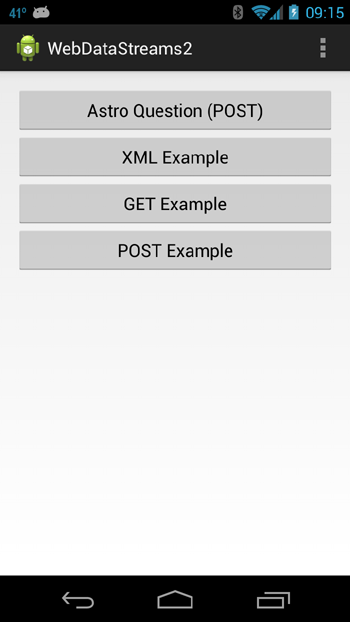
Right-clicking on the project name and choosing Run As > Android Application for an emulator or connected device should give an initial screen like the following figure.
|
Clicking the Astro Question (POST) button gives a screen like the figure below left. Answering the multiple-choice question and clicking submit gives a screen like the figure below right.
 |
 |
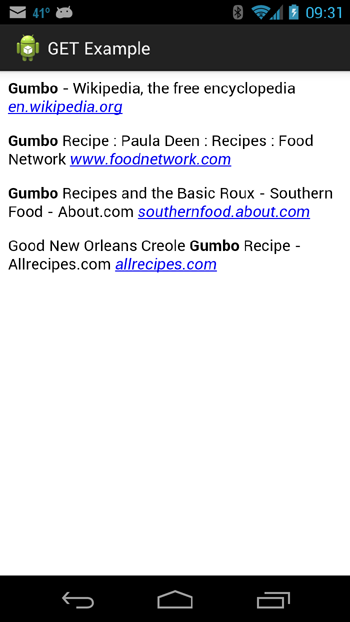
Clicking the XML Example button should give a screen like the one displayed below left, and clicking on the GET Example button should give a screen like the one displayed below right.
 |
 |
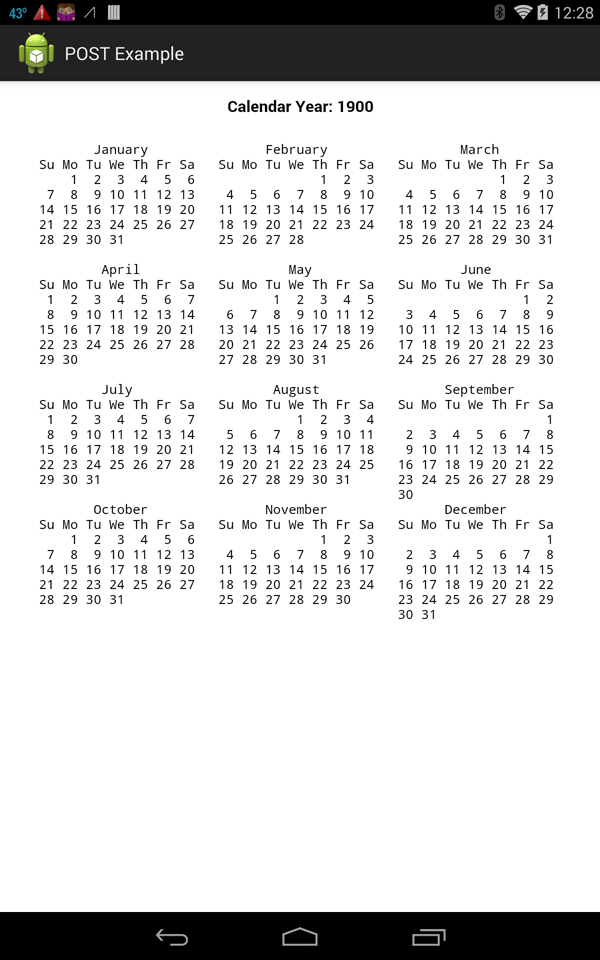
Finally, clicking the POST Example button should give a screen like the one displayed below,
|
which is a screen shot from a 7-inch tablet (if you display it on a phone, you may have to scroll to see the entire calendar display).
We now describe how the preceding code works. As already noted, we assume that the reader is familiar with the material already presented in WebDataStreams I. Thus, in the discussion here we will only describe some new features of network data access not already described there.
The classes AstroQA and AnswerScreen extend the example already presented in the class POSTexample described in WebDataStreams I into a basic astronomy quizzing app, with
The latter is elementary logic and UI programming that should be relatively clear from the comments in the code, and so we won't describe it. The former is an extension of the POSTexample class discussed in WebDataStreams I and so also does not require much additional explanation.
The classes astroQA and answerScreen, and the corresponding layout files astroqa.xml and answerscreen.xml, make extensive use of the widget classes
|
The most important new element introduced in AstroQA is that it implements the POST server access using either the Apache HTTP classes (as was done in the class POSTexample in WebDataStreams I) or the HttpURLConnection classes. This is controlled by the boolean parameter useApache defined in the doInBackground method of the inner class BackgroundLoad in AstroQA.
The relative merits of using these two approaches has been discussed briefly in WebDataStreams I, and more extensively in the blog post Android's HTTP Clients.
The class XMLexample illustrates the retrieval and parsing of data in XML format over a Web connection. The basic techique implements
Thus, we won't dwell on the functionality of XMLexample. The most important issue is the structure of the data that we have to retrieve and parse. We illustrate in this example by retrieving an RSS feed in XML format.
Lots of information is available in the form of
RSS (Really Simple Syndication or Rich Site Summary) feeds, which return data in an XML format. A newer alternative for web syndication is
Atom, which uses a different XML format (and a philosophy that differs on some technical points). We shall illustrate using RSS, but a similar approach can be used for an Atom feed.
Our example will use one of the hundreds of free RSS feeds available from
Feedzilla.
Basically, there are two issues to address:
|
For example, if we go to FeedZilla, choose Science > Physics, and then examine the page source for what the browser displays, we will see that it is an XML document having the following form
   <?xml version="1.0" encoding="utf-8"?><?xml-stylesheet type="text/xsl" href="/styles/rss20.xsl"?>
   <rss xmlns:a10="http://www.w3.org/2005/Atom" version="2.0">
      <channel>
         <title>Feedzilla: Physics News</title>
         <link>http://news.feedzilla.com/en_us/news/science/physics.rss?client_source=feed</link>
         <description>Physics News</description>
         <copyright>Copyright (c) 2010 Butterfly Effect Ltd.</copyright>
         <image>
            <url>http://s.feedzilla.com/images/logo_feedzilla164_48.png</url>
            <title>Feedzilla: Physics News</title>
            <link>http://news.feedzilla.com/en_us/news/science/physics.rss?client_source=feed</link>
         </image>
         <item>
            <guid isPermaLink="false">feedzilla.com:108985881</guid>
            <link>http://news.feedzilla.com/en_us/stories/science/physics/108985881?client_source=feed&format=rss</link>
            <a10:author><a10:name /></a10:author>
            <title>MIND  in Pictures:  It Came From the Third Dimension (Scientific American)</title>
            <description>
            [Large block of encoded HTML]
            </description>
            <source url="http://rss.sciam.com/sciam/physics">Scientific American</source>
            <pubDate>Sat, 02 Jul 2011 15:00:00 +0100</pubDate>
            <a10:updated>2011-07-02T15:00:00+01:00</a10:updated>
            <a10:rights type="text"></a10:rights>
         </item>
         <item>
            .
            .
         </item>
            .
            .
      </channel>
   </rss>
where we have omitted displaying a large block of encoded HTML between the <description></description> tags because it is used to format the web page and is not relevant to the present discussion (the way in which such HTML is embedded is one of the differences between RSS and Atom). Note: The page source may display the above all as a single line, so you may have to insert various newlines with an editor to get the above format.
If you look at the address shown for the web page that you just displayed, it should be
http://news.feedzilla.com/en_us/headlines/science/physics.rss
If, on the page displayed (the browser page, not the source) you hover the mouse over the top left Feedzilla: Physics News header your browser status bar should display
http://news.feedzilla.com/en_us/headlines/science/physics.rss?client_source=feed
which is the form of an HTML GET request, with the data payload url-encoded after the question mark. Thus, we may use either of the above two addresses to access the RSS feed, and the data returned will have the XML structure shown in the listing above. Our primary interest will be in the various <item></item> tags in the returned XML, each of which contains a headline and a corresponding web link that we use an XML parser to extract in XMLexample. The result is the figure labeled XML Example above, which displays a set of Web links extracted from the RSS feed.
The class GETexample is quite analogous to the class GETexample described in WebDataStreams I, in that it uses the GET method to retrieve data in JSON format, parses the data into HTML format, and displays it in a WebView. The primary difference is that in the present case we use the HttpURLConnection classes rather than the Apache classes used in WebDataStreams I to make the HTTP connection (and we connect to a different webpage). We have already described basics of using HttpURLConnection for the class BitmapExample in WebDataStreams I. The result is the figure labeled GET Example above.
In the class POSTexample we illustrate the use of HttpURLConnection classes to make a POST access to a server running a Unix shell script that returns a calendar for an arbitrary year in the United States and England. It is also valid in other countries for years after the adoption of the Gregorian calendar. It may not return a correct calendar for years in those countries before they adopted the Gregorian calendar because the adoption date varied from country to country (see the box below). The figure labeled Post Example above shows the calendar for the year 1900 AD displayed on a tablet. This calendar format will also display on a smaller phone screen, but then you may have to scroll to see all of the months.
The Gregorian Calendar was proposed in 1582 but not all countries adopted it immediately. It was adopted uniformly in Catholic countries, but Protestant countries often still used the
Julian Calendar, so the date could change by 10 days simply by crossing certain country borders!
|
| The complete project for the application described above is archived at the link WebDataStreams2. Instructions for installing it in Eclipse may be found in Packages for All Projects. |
Last modified: April 4, 2014